pleroma.debian.social

pleroma.debian.social

a different version of the same question: if you find man pages difficult or impossible to use, what makes them so hard? do you feel like it's something that could be fixed?

(other than "the lack of examples", which is possibly the #1 issue, also please don't tell me about tldr.sh)

@b0rk navigation through page is painful. Searching is not convenient. Maybe because I don't know all the shortcuts

@b0rk i have a hard time reading large amounts of text in the terminal, for some reason, and find it especially hard to seek efficiently through longer texts. That’s my issue number one.

My issue number two is they often use unfamiliar, ambiguous or unnecessarily terminology to describe things. Often programs have their own terminology local to themselves.

Issue number three is search isn’t very good. Together with issue number one this is Very Bad.

@b0rk if I have to look up the explanation for a particular option there's a 3 in 5 chance that I will be unable to use the search tools of the builtin man viewer to locate it. The search capabilities are too primitive IMO compared to what I've grown accustomed to with modern IDEs and I feel pretty out of my depth outside very basic search queries in `man`.

@b0rk authors are confused as to whether they’re writing a reference, a tutorial, or a demo. Also very few readers know their pager’s features and so it’s a lot of page up/down.

@b0rk making them is a PITA, but as a reader, early exposure to info docs made me forever grateful for man pages.

@b0rk also, paging, cross referencing and so on. Most man pages are best read as web documents, by far.

@amanda web man pages are so good

@b0rk
Assumed information!

Exhibit A: Neomutt begins by telling you how to configure colour. It assumes you can set up notmuch, and have opinions about x vs y email stuff.
https://splint.rs/posts/neomutt/

Out of order info.

Exhibit B: calcurse keeps telling me about using -Q, before introducing -Q.
https://splint.rs/posts/docs_bitch/

@b0rk Search. I'm usually searching for an option. I'm sure people with better CLI setups find it easy, but for me, I'd rather search in the browser.

Also, I think it may be just be that monospaced CLI text, for me, is not easy to scan through and read.

@b0rk the biggest problem with man pages is that you have to have a pretty good idea of the name of the thing you're looking for, or at least a keyword likely to appear in the synopsis.

For example,

$ man rename

Tells me about the rename() system call on BSD, and about something called "file-rename" in the perl documentation on my linux box.

@b0rk I think my main issue is that I have a hard time remember the SYNOPSIS syntax (could be a me problem)

@defuneste it's tough, even though I think I know the syntax sometimes I find it hard to decode what it's trying to tell me

@b0rk man pages, like so much other technical documentation, is written by people who don't need the documentation any more, but are unable to "pretend" they do. Basically, https://xkcd.com/2501/

@b0rk i feel like the number one problem i run into with documentation of any sort is jargon. and that’s very likely a hard problem to solve because at some level of technical depth, jargon is pretty much necessary, or its lack would be disorienting for people who know more about the field.

but too much of it makes things opaque to people who just want the thing to do the thing. (added bonus: english as a seco— wait, no, third language)

@gekitsu yeah jargon is a huge problem and i think it's extremely possible to address

@tkissing yea one thing i've been thinking about is how a lot of these old C projects have kind of an arcane system for contributing to them and it can be really hard for a "regular" user of the tool who might want to contribute to the docs to navigate

i feel like at this point I can make my way through arcane systems if I want to make a contribution but I definitely could not have done it 15 years ago

@sysedit the post said "if you find man pages difficult or impossible to use", not "if you think man pages are almost perfect"

@b0rk Navigation, especially for larger docs. No TOC (I know there is some structure, but I always search a long time when looking up variable expansion rules for e.g. bash). Everything is just one long page usually, the old info format was much better. The original language (troff,groff) for writing man-pages is really arcane, thankfully there is a converter for ASCIIDOCTOR to troff.

@b0rk They often seem to be geared towards people who already understand the command, rather than explaining to people who don't.

@b0rk I’m not the target audience for that question anymore, but I was when I started more than 20 years ago. The biggest hurdle was that I didn’t know how to properly search in them. These days, I’m mostly annoyed by people who think different formatting for `--help` constitutes a manual. And then there’s the “Oh, you need `info` for detailed documentation” for some old stuff -.-

@b0rk

Beyond lack of examples & pages written as though the reader already knows the options, my main issue is when the man page references some kind of 'standard options' that aren't described there.

Larger projects with a lot of tools can do this. Often, they're simply noted with no context. Sometimes they aren't directly referenced at all, you just need to work out that the man page doesn't have all of the info and you need to go elsewhere for it.

@b0rk possible for sure! but i can see why it often isn’t being addressed when you put together highly-subject-matter-involved people writing it, and writing with a condensed length in mind.

this isn’t me poo-pooing manpage/--help writers, this is me sympathising.

@gekitsu oh yeah I was trying to agree with you :)

it's really hard especially for people who are not used to doing it and who are really immersed in the topic

@joewells thanks, this is a great point. do you have an example in mind?

@b0rk despite being a heavy terminal user for 30 years, reading man pages via the terminal interface is a last resort, too small, hard to navigate and see the big picture. Stuff like this helps. https://www.zdnet.com/article/my-2-favorite-tools-for-reading-linux-manual-pages-the-easy-way/
Also sometimes when typing "man blah" the manual page is from a different section and refers to some c library calls, and you have to override with -s . By then I just start looking for web docs.

Despite all that it's better than that "info" nonsense that some gnu tools use

@b0rk lack of hyperlinks, which means some man pages are either excessively verbose or miss important context.

@b0rk As a screen reader user, lack of semantics.

I find what is essentially plain text difficult to scan to find stuff, and there's aspects of formatting that might visually read nicely but get in the way of speech output or don't translate well.

If I ever do read man pages, it's in a browser where there might at least be headings and list markup.

In practice though, HTML rendering is extremely inconsistent across pages.

Separately, I wonder if the idea of a man page really holds up for complex tools with multiple subcommands (Git) or thousands of hierarchical features (FFmpeg).

@b0rk It would be nice to have an option which isolated one section? Say the man page for foo contains a flag --bar but it's huge and I have to go searching for it; I would like to use "man foo --only bar" and see just that section?

@b0rk I would love if the output had some more formatting, such as colors for headers or code snippets. I think that would make it easier to scan thru them and find what I'm looking for. I know it can be done but the way to do that I've seen seems kind of awkward to me (https://linuxtidbits.wordpress.com/2009/03/23/less-colors-for-man-pages/)

@b0rk

Of course now all the ones I'm looking at are well-behaved little angels 🙃 . Wish I had a good example for you

@b0rk man pages can differ a lot in regards of their target group. Sometimes a man page seems like a full blown tutorial or it's boiled down to just the pure essentials. Those manual pages were written by many different people but at times it's frustrating to wade through walls of unknown terminology and/or not finding anything at all. Maybe it's a skill or patience issue of mine, I don't know. ^^'

Perhaps more interactivity would fix this but there are info pages but I rarely use them ...

@b0rk Searching for things like -e usually yields tons of irrelevant hits (e.g. see also: --no-skip-existing), and it's unpleasant to have to look for the actual entry for -e.

@b0rk oh one more... I have always had a hard time with the numbered sections. For years when I saw things like "isatty(3)" or "bash(1)" while reading the bash man page, I had no idea that meant they were referring to a specific section of a manual. It's a learnable convention but for people who haven't learned it, it's not that discoverable IMO

@b0rk the main difficulty I have is with searching for specific short flags. E.g., if I want to see what -f does then `/-f` will also get me hits for things like -F and --force (latter case can be worked around with `/^ *-f`, but still).

@b0rk people have already given my answers, so just for completeness' sake,

- no TOC or other structure
- no (hyper)links
- search/navigation sucks

@b0rk god, how can one *not* answer "lack of *good* examples" on this one :p there are *so* many manual pages without examples section, or useless ones, it's such a huge issue! i think it's what, as a newbie, made me feel stupid the most when first encountering UNIX in general and manpages in particular

@b0rk so that you can forgive me, i'll try to really answer now: i think the biggest problem with manpages is that, like so much documentation,they assume too much internal technical knowledge. they are often written in the "reference" or "discussion" panels in the "diataxis" graph, while they should *really* focus more on "tutorial" and "howto", and spin out the reference stuff in other manpages. the manpage system is well built for this: commands are in (1), file formats in (5), and shove everything else in (7) or (8). unfortunately, too many pages try to cram everything in (1) and fail to carry anything significant

@b0rk "too long" is also a common flaw in manpages. bash(1) is 50k words. that's unforgiveable. it could *easily* be split into a bash(7) that describes the shell programming language, for example, and even that could (should!) be split between POSIX and bashisms, for example...

@b0rk i would also argue that very long options list make manpages hard to read, but that's essentially impossible without fixing the commands themselves...

@Anarcat @b0rk I could get behind a split like that, if our default man viewing tools could handle cross references and such better. Obviously non-default ones do, but the default is important imho because it’s what beginners will experience
replies
1
announces
0
likes
0

@b0rk they're a commitment.

i needed to learn Unix in a hurry before the days of the web (or the public internet really) so went through every man page in section 1, trying things out as I went. I learned a huge amount from them but at first it was really tough to get my head around the way they were written. Being familiar with your pager's functionality definitely helps.

I'm sad these days when a command doesn't have a man page, using -h or --help is always my second impulse.

I recently discovered that the man page for ack is the source code for ack, which is truly obnoxious.

@b0rk The formatting and navigability of content could be so much better with hypertext. I've used something like a text/terminal version of Tiddlywiki but so long ago (DOS application) I can't recall what.

Extraordinary, really, that nobody has done what you're now doing. 👏

@b0rk The problem I regularly have is I think "what are all the options for %f in printf?" Well first, I do `man printf` and get the page for the shell command, not the c function, and after I do `man fprintf`, I find out %f isn't even there

@b0rk
Sections.

I need to lookup the fields for crontab:
"man crontab"
Sure that will get you a page, but not the one you need.
"man 5 crontab" has the info, but as a new(er) user, I'd have to know to look at "See Also" on the first page to get the relevant page.

@b0rk I’ve often found man pages hard to read on a wide terminal emulator. `export MANWIDTH=100` (or similar) in a bashrc has helped a lot with legibility.

@b0rk

Thinking of the bash man page .... soooo long. For a long time I didn't know you could use the vi/less search commands. I didn't know what all the sections were, so I didn't know what sort of stuff I could look up.

Man pages generally:
I didn't know there were different manual sections (1=cli commands, 2=syscalls, 3=library calls, 5=config files, etc).

@b0rk The ordering of the parameters always seems wrong to me. Like for ‘wc’ (macOS), why the heck is --libxo the first option listed?!? And then -L?? It’s not alphabetical, so shouldn’t it be in order of common usage? (and the examples are there, but they’re terrible)

@b0rk Discoverability is almost nonexistant. Despite supposedly being a manual, there's no table of contents you can look through to see which man pages exist! At best you can look at the "SEE ALSO" section to find related commands (often recursively), but goot luck finding a "cluster of commands/functions" that you don't even know exists, because you haven't seen it mentioned anywhere...

@b0rk generally: manpages are a 35 year old system and it shows. It needs to be more like a web page with links and search and table of contents. (and not like GNU info. a terrible ux)

Beyond the poor UX of the man command itself, formatting of a manpage makes a huge difference to readability and something that could be fixed.

@b0rk they are often written as a dense reference of everything possible, and not organized for easy discovery of the most usual use cases, so finding what you need is very slow. Formatting usually is a wall of text without emphasis on the structure.

(For reference, I started programming and using Unix before the web existed so I’m quite used to having to read man pages.)

@b0rk a) despite using Linux for 18 years, I don’t know how one is supposed to use the command-line man viewer other than scrolling up and down; it is Not Comfy and I find it a lot easier to look at html’ized versions online

b) man pages tend to be written in the spirit of “it is not, legally speaking, undocumented” with just an alphabetized wall of options that can stretch into the hundreds

@0xabad1dea @b0rk

a. Try pressing h while viewing a man page, it should show you the supported keybindings and their uses. It's usually less(1) that gets used as a pager, which can be changed to something else.

b. Man pages are 'reference manuals', which are supposed to be used more like dictionaries.

@b0rk I just forget they are there

I used them a lot in the pre-Google days. Then one day Google got good enough. Then Google got faster and better

@b0rk whenever I attempt to use man I'm flooded with a wall of text that feels incoherent and overwhelming, while I'm a highly technical person it feels like reading a high level scientific publication on a topic foreign to me instead of a user manual
probably lack of experience makes it worse, but I rarely even try with google at hand, I get answers and keep doing my thing instead of matching puzzles distributed over a phonebook worth of text

@0xabad1dea @b0rk for me it got more useable when i found out about "/..." (to search for "..." - same as in vim and less) and "n" to search for the next occurrence, because usually when looking at the manual i want to find a specific option.

@b0rk a parser for man pages would be useful, or man pages should be written in a syntax that is conducive to parsing. This would make it easier to write other programs that generate a table of contents.

@b0rk Compared to programming, exposition in natural language can be considered a distinct skill altogether, needing to be honed seperately. Pedagogical materials about composing effective documentation might help those willing to learn and improve their skills.

Notwithstanding our fondness to manual pages as a representative of *nix culture and philosophy, we still have to consider the its relevance to those finding the underlying philosophy unappealing; given the volunteer-driven nature of FOSS projects, man pages are thus driven to obscurity, outside of its dedicated userbase.

In my imagined overhaul of manual page ecosystem, I would like to see (off the top of my head): a better authoring language than man(7) or mdoc(7) (while doubling down on mdoc’s take on semantic requests, unlike scdoc; see reStructuredText, AsciiDoc, Org mode or Typst for inspiration), with readable request names (even if we choose to stick to roff(7) style requests), a graphviz/mermaid like DSL to save us from manually drawing ASCII art diagrams (as much as we are fond of them), support for hyperlinks and hierarchically organized documentation (we need to do better than the friendly info, at least, all the while not turning as bloated), and so on. If there’s any interest in this direction, I’ll be quite happy to participate.

@smlckz yeah i’ve used tools to convert AsciiDoc or RST to man pages and it was a good experience, the git and dig projects use them for example if you’re interested

@b0rk My biggest gripes are 1) the lack of consistency in what gets included, and 2) pages not being kept up to date.

@b0rk occasionally man pages for CLI tools drift hardcore into technical jargon and being overly correct.

@b0rk They are hard to contribute to. I'm glad they exist, but the syntax is a big hurdle for new contributors.

This also makes it harder to add a man page to a project that doesn't have one yet.

@b0rk It's also such a shame that they don't reference code. I can be on a Linux box where the entire stack is open source, but `man malloc` doesn't show the current implementation!

@0xabad1dea @b0rk I run into the opposite problem with "info" pages. The more/less style bindings are finger familiar to vi users, and I've never gotten used to emacs-like bindings that info uses.

The other problem you're mentioning is the "encyclopedia" problem. Finding the most used options is more important than the full set of options.

@b0rk Both.

Easy: it's just a relatively small text file, so either read page by page or (more commonly) search for something.

Hard: It's just a relatively small text file. That means documentation of each option is between 1 and maybe 10 lines. There's no "expand to show more", no hyperlinks with more details, only ASCII graphics. Also, if you're searching for a concept (how do I make it do X) not a word, it can be frustrating.

@b0rk some kind of fuzzy or semantic search would be nice, or maybe adding your own annotations.

often i feel like i already need to know what to search for, working my way backwards. for example I often forgot the `grep` flag that does a simple string match. i have to know that the flag modifies the way that "regular expressions" are used and only when i have that keyword i can search for it.

@b0rk Navigation is a constant issue with man pages. Besides that it can be difficult to find related man pages about same application/toolset, since those can be split to multiple separate documents.

Increasing problem these days is that more recent applications lack man pages completely, as less and less developers know how to make them anymore. Some kind of tutorial about basics of man page authoring would be more than helpful for a lot of developers, as more people would likely include those to their projects if the authoring process would be easier to handle. Besides of that, installation of 3rd party man pages might also be confusing for part of users.

@b0rk was just reading the pthread_create page and remembered your question. What I miss there and usually find on the docs from the Kronos Group, for example, are clear sections describing the parameters and return values.

Sure, the pthread_create text probably discusses the matter in depth, but I just want to know about the damn first parameter

@b0rk In many cases I think the thing being described is unnecessarily complex, and because (reasons) man pages strive to list all the options, those are also unnecessarily complex. And we can't trash the useless corner-case options, because reasons.

First page of output from 'man diff' on a Mac laptop.  The "synopsis" fills most of the page, listing 7 different ways of invoking diff, with as many of 9 lines of options on a single way of invoking diff.

I.e., it's a wall of textual WTF.

@jmtd @b0rk oh god yes, that: pagers are currently very poor manual page browsers! emacs has a slightly better one, but even that is not as good as its info system

@jmtd @b0rk every manpage browser should have a "jump to" feature to browse around the table of contents, follow cross-references, and full text search *across all manual pages* or, even better, across *all manual pages of a similar project*. i have repeatedly found myself searching around the systemd manuals for where the darn setting is (systemd.service? nope. systemd.unit? nope. gaah wtf is systemd.exec... )

@Anarcat @jmtd is there a man page browser that does this? (emacs?)

i was trying to hack on something like this yesterday to view local man pages in the browser (basically a crappy wrapper around cat $(man -w tcpdump) | mandoc -Thtml)

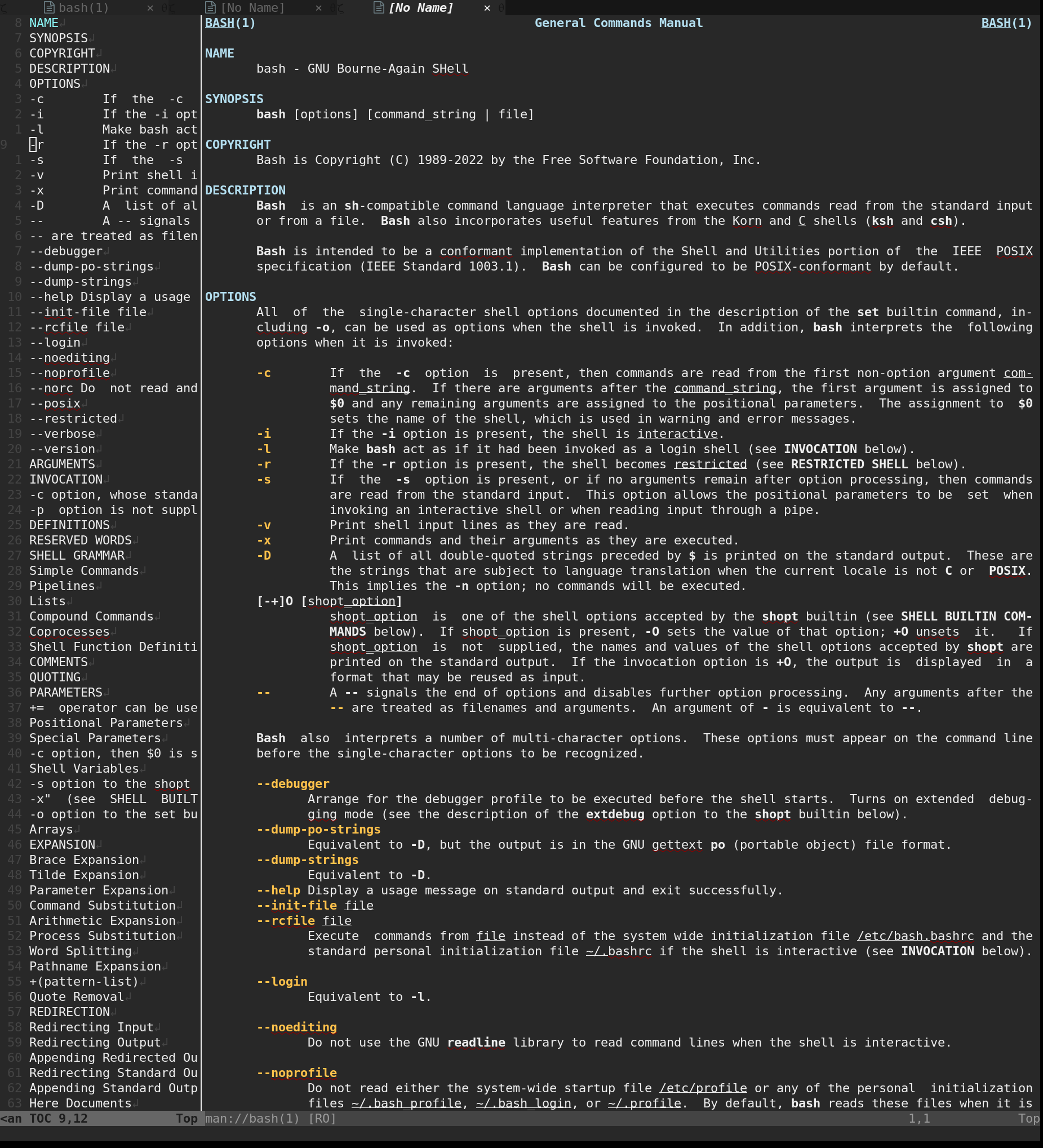
@b0rk @Anarcat the sidebar specifically? (neo)vim does, but it takes some coercing to put it there. I would not recommend (neo)vim as default man pager (or editor) for beginners (despite using it myself)

screenshot of neovim displaying Man bash(1) in the main, right-hand pane, and its outline in the left-hand pane

@b0rk @jmtd bizzarely, https://manpages.debian.org/ might be the closest we have on this: it does not have full text search, but it has cross-referencing, table of contents, per-package manpage lists... so before you start writing your own man2html website (like I did!), look at what @zekjur did first (like I did not)

@Anarcat @jmtd @b0rk the cheat code for systemd specifically is `man systemd.directives`, which points you at the right manual page for every possible rune.

@b0rk @jmtd and yes, emacs does a lot of those, of course: it has a table of contents browser, and cross-referencing. it does not have full text search (unless you count `M-x grep` in `/usr/share/man` which doesn't really count because (1) the CWD is not correct while browsing manpages and (2) even if it would, emacs doesn't open .1.gz files correctly) and does not have per-package manual search or listing

@olasd oh wow, that's a great tip!

@Anarcat thanks, whenever i have an idea I always assume someone else has done it first and better but it's always so hard to figure out who that person is :)

@b0rk the world (and its internet) is big and diverse! and search engines are dying, so it doesn't help... thankfully we still have communities like here where our collective minds can share knowledge :)

@Anarcat yeah, it's a life-saver when you want to know what directives you're allowed to use /on the systemd version that the system is actually using/ (rather than whatever version a web search engine will turn up)